HammerForge Prototype Textures
Last updated: October 21, 2026
HammerForge ships with 150 built-in prototype textures designed for greyboxing and level layout testing. Each texture is a lightweight SVG that renders at any resolution, making it ideal for quick material differentiation during early design phases.
Overview
Prototype textures let you visually distinguish surfaces without importing external assets. They are organized by pattern (shape/style) and color, giving you 15 patterns x 10 colors = 150 unique textures.
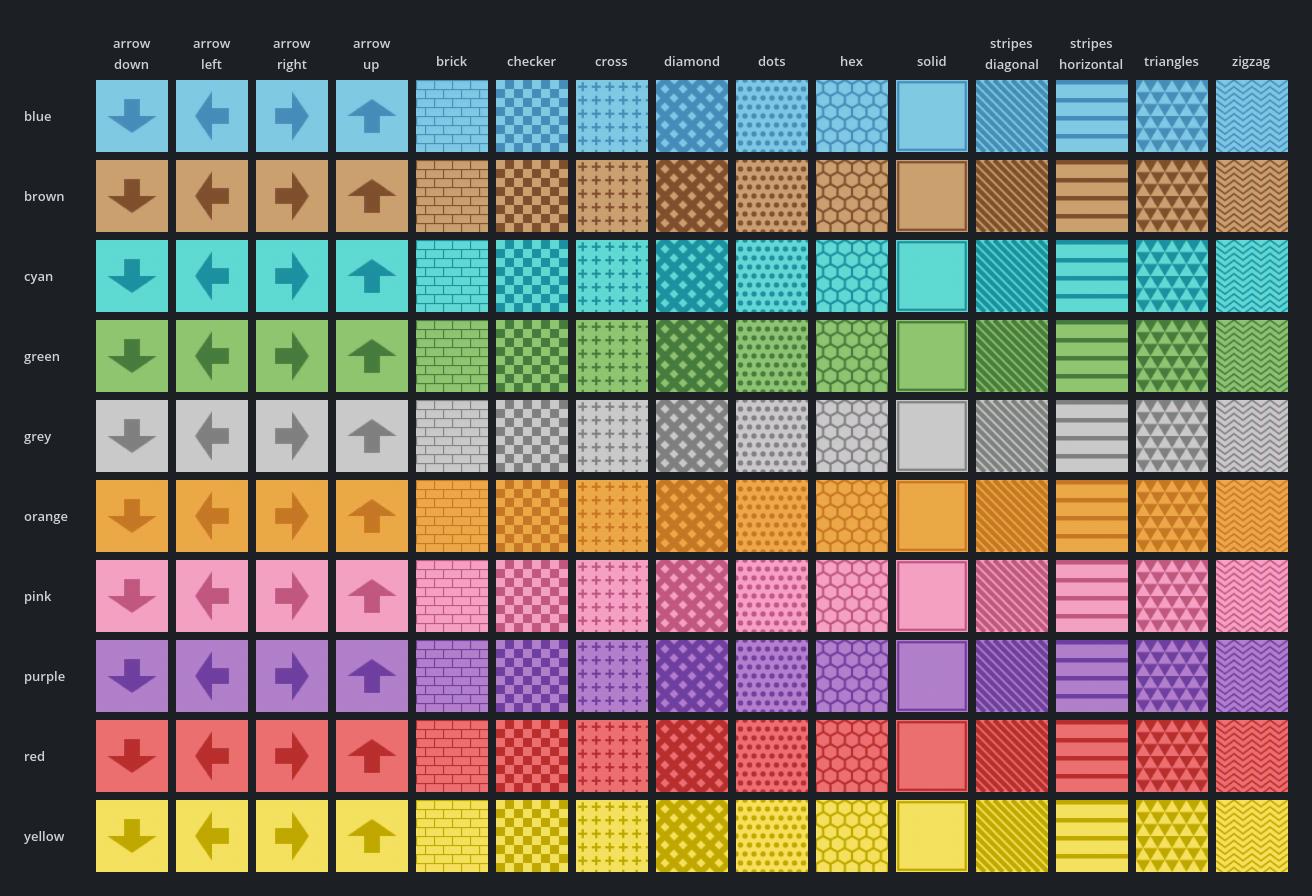
Common use cases:
- Greyboxing level geometry with distinct surface identifiers.
- Marking directional arrows on floors and walls for flow testing.
- Differentiating rooms, zones, or material regions during layout iteration.
Available Patterns
| Pattern | Description |
|---|---|
arrow_down |
Directional arrow pointing down |
arrow_left |
Directional arrow pointing left |
arrow_right |
Directional arrow pointing right |
arrow_up |
Directional arrow pointing up |
brick |
Brick wall pattern |
checker |
Checkerboard grid |
cross |
Repeating cross / plus pattern |
diamond |
Diamond / rhombus tiling |
dots |
Regular dot grid |
hex |
Hexagonal honeycomb tiling |
solid |
Flat color fill with border and label |
stripes_diagonal |
Diagonal stripe pattern |
stripes_horizontal |
Horizontal stripe pattern |
triangles |
Repeating triangle tiling |
zigzag |
Zigzag / chevron pattern |
Available Colors
| Color | Hex (approximate) |
|---|---|
blue |
#4488CC |
brown |
#886644 |
cyan |
#44BBCC |
green |
#44AA44 |
grey |
#888888 |
orange |
#DD8833 |
pink |
#CC6688 |
purple |
#8855AA |
red |
#CC4444 |
yellow |
#CCBB33 |
File Location
All prototype textures are located at:
res://addons/hammerforge/textures/prototypes/{pattern}_{color}.svg
For example: res://addons/hammerforge/textures/prototypes/checker_red.svg
Godot 4.7 automatically imports SVGs as CompressedTexture2D resources.
Usage via Editor UI
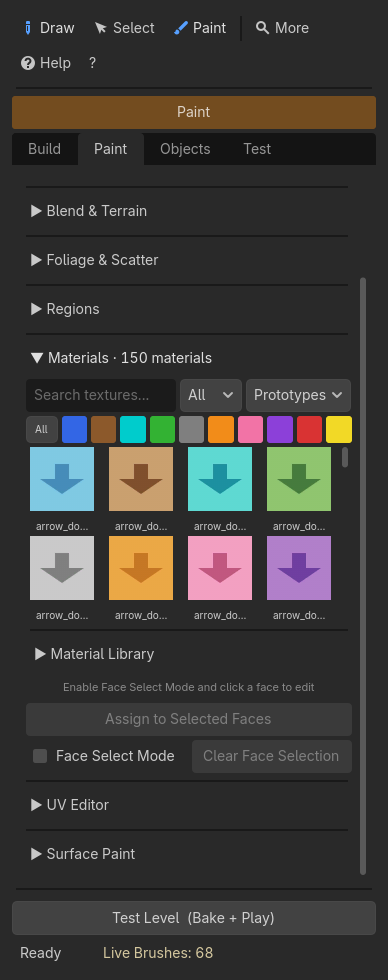
- Open the Paint tab in the HammerForge dock.
- In the Materials section, open Material Library and click Refresh Prototypes. Remove Unused beside it takes back the slots the level never used.
- All 150 prototype materials are added to the palette and displayed as a visual thumbnail grid in the Material Browser.
- Use the pattern dropdown, color swatches, or search bar to filter the grid.
- Click a thumbnail to select a material. Enable Face Select Mode and click faces in the viewport.
- Click Assign to Selected Faces, or right-click the thumbnail for more options (Apply to Whole Brush, Toggle Favorite, Copy Name).
- Press T to use the Texture Picker — click any face to sample its material back into the browser.
The "Refresh Prototypes" button loads StandardMaterial3D resources with each SVG set as the albedo texture. Material names follow the format proto_{pattern}_{color} (e.g., proto_checker_red). The browser shows the actual SVG preview as each cell's thumbnail.
Usage via GDScript
The HFPrototypeTextures class provides a static API for working with prototype textures programmatically.
Load a single texture
var tex: Texture2D = HFPrototypeTextures.load_texture("brick", "orange")
Create a material
var mat: StandardMaterial3D = HFPrototypeTextures.create_material("checker", "red")
# mat.resource_name == "proto_checker_red"
# mat.albedo_texture is the checker_red.svg texture
Batch-load into MaterialManager
var count := HFPrototypeTextures.load_all_into(level_root.material_manager)
print("%d prototype materials loaded" % count)  # 150
Query available options
var patterns: Array[String] = HFPrototypeTextures.PATTERNS   # 15 entries
var colors: Array[String] = HFPrototypeTextures.COLORS        # 10 entries
var all_paths: Array[String] = HFPrototypeTextures.get_all_texture_paths()  # 150 paths
Check existence
if HFPrototypeTextures.texture_exists("hex", "purple"):
    var tex = HFPrototypeTextures.load_texture("hex", "purple")
API Reference
HFPrototypeTextures (RefCounted)
| Member | Type | Description |
|---|---|---|
BASE_DIR |
String |
"res://addons/hammerforge/textures/prototypes/" |
PATTERNS |
Array[String] |
All 15 pattern names, sorted alphabetically |
COLORS |
Array[String] |
All 10 color names, sorted alphabetically |
| Static Method | Returns | Description |
|---|---|---|
get_texture_path(pattern, color) |
String |
Resource path for a pattern/color pair |
texture_exists(pattern, color) |
bool |
Whether the texture resource exists on disk |
load_texture(pattern, color) |
Texture2D |
Loaded texture, or null if not found |
create_material(pattern, color) |
StandardMaterial3D |
Material with albedo set, or null |
load_all_into(manager) |
int |
Loads all 150 into a MaterialManager; returns count |
get_all_texture_paths() |
Array[String] |
All 150 resource paths |
In-Editor Preview
The Material Browser in the Paint tab now displays all prototype textures as a visual thumbnail grid with search and filters. This replaces the need to use the external HTML preview for most workflows.
HTML Preview (Legacy)
prototype_textures_preview.html shows all 150 textures in a searchable grid. It is one self-contained HTML file with every SVG inline, so it also opens straight from docs/ in a checkout.
Technical Notes
- All textures are SVG format, ranging from ~200 bytes (arrows, solids) to ~5 KB (diamond pattern).
hexandtrianglesare written bytools/make_prototype_patterns.py; its--checkfails when a file on disk differs from what it writes.- Total disk footprint for all 150 SVGs is under 500 KB.
- Godot's SVG importer converts them to rasterized
CompressedTexture2Dat import time. - Materials created by
create_materialuseTEXTURE_FILTER_LINEAR_WITH_MIPMAPSfor clean rendering at varying distances. - The catalog uses hardcoded arrays rather than directory scanning, ensuring compatibility with exported builds and headless test environments.
See Also
- HammerForge Texture and Materials -- per-face material system, UV editing, surface paint.
- HammerForge User Guide -- general usage documentation.