Agent Bridge (MCP)
The Agent Bridge lets an AI agent that speaks the Model Context Protocol build in the level you have open in the Godot editor. You ask it for a room, a corridor or a fix, and it places and changes brushes the way you would, each change one step in the editor's undo history. Claude Code, Claude Desktop and any other MCP client that runs a local server over stdio can use it.
It has two parts. The listener is in the HammerForge addon and is off until you
turn it on. The server, hammerforge-mcp, is a small Python program your MCP
client starts. It lives in the repository's
hammerforge_mcp/
folder and is not in the Asset Library download.
The bridge is in the addon from HammerForge 0.4.0. 0.3.2 and earlier do not have it.
What it can and cannot do
An agent on the bridge can make a starter level, place, move, turn, resize, delete and extrude brushes, paint them with palette materials, stand the player spawn, place, move, retune, wire, unwire and delete lights, sounds, props and logic entities, make a brush a trigger, a door, a button, a wall, a detail or a clip brush and wire it, hollow, clip, carve, merge, intersect and hull brushes, snap them to the grid, build stairs, arches, domes, rings and door frames and change or detach them, place prefabs from the library and switch and propagate them, mark out the parts of the level a partial bake takes with cordons, list brushes, materials, entities and cordons, check the level, take screenshots, bake, and undo its own steps.
It cannot save your scene, open or delete files, run the game, change project settings, or reach anything outside the open level. The one file it writes on its own account is the bake it makes when you ask it to bake. Two more change as they do for your own edits: a material it applies goes on your Recent row in the material browser, which is kept in your preferences file, and with region streaming on, an undo of its paint rewrites the region files that paint is in.
It cannot pick faces or use the selection, so the commands that work on picked faces or on what is selected stay with you: the UV and texture tools, Apply Picked Look, Mirror Copy, Offset, Pick Pivot, Grow and Shrink, Apply Rotation and Scale, and Convert to Brushes. A Trim Run is built along picked wall faces, so it cannot build or re-pick one; it can change or detach one you built (see below).
How it keeps your work safe
- Off until you say. You tick a box to turn it on. It is off again every time the editor starts.
- This machine only. It listens on
127.0.0.1. A new random token is made each time you turn it on, and written to.godot/hammerforge_mcp/in your project, a folder only your user can read. Git and exports leave.godot/out. - Every change is one undo step. Each one is named
MCP: ...in the editor's history, so Ctrl+Z takes it back like any of your own. A change that fails part way leaves the level as it was, and one that changes nothing, such as Move to Floor on a brush already on the floor, records no step. - The agent only undoes its own work.
hf_undotakes back the agent's lastMCP: ...step, and refuses once you have touched the level since, even if you undid what you did. - It stays on the level it was given. Switch to another scene tab and the
agent's next change is refused until it looks again with
hf_get_status. - It leaves locked work alone. A brush or entity in a locked visgroup, or
with Godot's lock on it in the Scene dock, is refused to every change with the
code
locked, andhf_get_brushesandhf_get_entitiessaylocked: truefor it (#1697).
Set it up
You need Python 3.10 or newer, and an MCP client.
-
Install the server.
pip install "git+https://github.com/saworbit/hammerforge.git#subdirectory=hammerforge_mcp"That installs the server from
main, for the addon onmain. The server is versioned with the addon, so with a released HammerForge put its tag after.git,@vand the version inaddons/hammerforge/plugin.cfg, such ashammerforge.git@v0.4.0#subdirectory=hammerforge_mcp. Step 3's--checksays when the two are apart, and prints the line to install. From a clone of the repository,pip install ./hammerforge_mcpdoes the same. With uv you can skip installing and let your client runuvx --from "git+https://github.com/saworbit/hammerforge.git#subdirectory=hammerforge_mcp" hammerforge-mcp. -
Turn the bridge on. Open your project in the Godot editor. In the HammerForge dock, open the Test tab, then Agent Bridge, and tick Allow agent connections (MCP). The lamp turns amber and the line beside it says which port it listens on.
-
Check the server can reach it.
hammerforge-mcp --check --project /path/to/your/godot/project--projectis the folder withproject.godotin it. The check says which scene and level the bridge is on, or what is wrong and how to fix it. Then it prints the lines to add the server to a client, with the full path of the Python it runs under. Use those: a client started from the desktop does not read your shell's PATH, so a barehammerforge-mcpmay not be found. -
Add it to your client. For Claude Code, run the
claude mcp addline the check printed. It adds the server for you in that folder. If that command will not run in your shell, save the JSON block as.mcp.jsonin the project's root instead; Claude Code asks you to approve it the first time. It holds your machine's paths, so keep it out of git. For Claude Desktop, put the JSON block inclaude_desktop_config.jsonand restart it. Other clients that read anmcpServersblock take the same one.
The lamp turns green when an agent connects.
Ask it for something
The server offers three prompts your client can list. In Claude Code they are in
the / menu, and arguments follow separated by spaces:
/mcp__hammerforge__block_out_room 20 12 6 asks for a room 20 m wide, 12 m deep
and 6 m tall.
- Block out a room (
block_out_room, with width, depth and height): floor, walls, ceiling, a doorway and the spawn in one undo step. The prompt works out every size and centre, so the agent has no arithmetic to get wrong. - Review the level (
review_level): checks the level, looks at it, and lists what to fix, without changing anything. - Bake for a playtest (
bake_for_playtest): fixes what the check reports, bakes, and says how to confirm the game runs that bake.
Plain requests work too. Some that go well:
- "Make a 20 by 12 metre hall, 6 metres tall, with a doorway in each short wall."
- "Put a 2 metre wide ramp from the floor up to the ledge at y 3 on the east side."
- "Paint the floor with the darkest grey in the palette, and the walls with the orange one."
- "Something looks off near the stairs. Take a screenshot there and tell me what."
- "Undo that last change and try it with the walls half a metre thinner."
Say sizes in metres. The agent is told the rest of the conventions.
Watch what it does
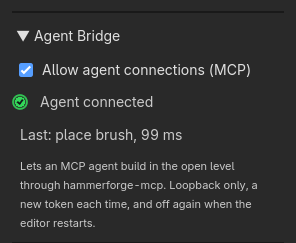
- The Agent Bridge lamp is amber while it waits, green with an agent connected, and red if it could not start. The line beside it says why, such as a token folder it could not close to other users, in which case it writes no token at all.
- The line beside the lamp says what is running now, such as "Running: bake".
- The line under it says what the agent last did, such as "Last: place brush, 14 ms", or why it was refused, such as "Last: undo refused: undo_conflict". A change that took brushes or entities away says how many, such as "Last: delete brush, 9 ms, 1 removed".
- After each change, the brushes it made or changed and the entities it placed, moved or retuned are outlined in the agent colour, which fades over 1.5 seconds. When none of them is in view, an arrow at the edge of the viewport points toward them. The camera never moves on its own.
- Click the Last line to select what the last change changed, then press F to frame it.
- Show agent changes under Test → Settings turns the outline and the arrow off. The agent colour is set under Colours with the others, and High Contrast changes it too.
- Each change is in the editor's undo history as
MCP: place brush,MCP: batch (6 ops)and so on. - The server logs one line per call to stderr.
--log-filewrites them to a file as well, and--log-level DEBUGadds the arguments of each call. The token is never logged. --record session.jsonlwrites every call as one JSON line, ready to play back. See Record a session below.
What the agent can call
| Tool | What it does |
|---|---|
hf_get_status |
Which editor, scene and level the bridge is on, the revision, counts, grid and camera |
hf_create_starter |
Make a level in the open scene: floor, sun and spawn |
hf_place_brush |
Place a brush: shape, size, position, a solid brush (union) or a cut brush (subtract), and a name if you want one |
hf_transform_brush |
Move a brush to a position, turn it to an angle, or both |
hf_resize_brush |
Give a brush a new size about its centre |
hf_delete_brush |
Delete a brush |
hf_extrude_face |
Add a box on one face of a brush, or a prism of the face when it is not a rectangle, the way the Extrude tool does |
hf_assign_material |
Put a palette material on a brush, or on some of its faces |
hf_set_spawn |
Stand the player spawn on a floor point, facing a yaw |
hf_place_entity |
Place a light, sound, prop or logic entity, or a note for the people working on the level, with its properties or a preset |
hf_transform_entity |
Move an entity, aim it, or both |
hf_set_entity_properties |
Change an entity's properties, a brush entity's by its brush_id, or apply a preset, checked as placing checks them |
hf_delete_entity |
Delete an entity and the wires aimed at it |
hf_add_entity_output |
Wire an entity's output to an input on a named target, such as a timer to a light's Toggle, or a trigger to a lamp |
hf_remove_entity_output |
Take a wire back by its place in the source's outputs |
hf_set_brush_entity |
Make brushes one trigger, door, button, wall, detail or clip brush, with a name to wire to, or untie them |
hf_get_cordons |
List the cordons a partial bake is cut to: each one's index, name, corners and switch, and the level's switch for all of them |
hf_set_cordon |
Add a cordon round brushes or at a box, or move, rename or switch one by index, or switch every cordon on or off |
hf_remove_cordon |
Take a cordon out by index; the level always keeps one |
hf_get_brushes |
List brushes with their faces and the structure or prefab copy each is a piece of, filtered by id or by a box |
hf_get_materials |
List the level's material palette, by id and name |
hf_get_entities |
List the level's point entities, the spawn included, with their properties and wiring; a brush made an entity is listed by hf_get_brushes |
hf_measure |
Measure brushes, faces, entities and points: sizes and volume, the gap between two (0 when touching, negative when overlapping), the gap along each axis, and the angle between two faces |
hf_plan |
A top down plan of the level drawn from its brushes, as a PNG or as SVG in metres: solids filled, cuts hatched, entities by kind, wires and cordons, one floor at a time by a height band. Works from a headless editor |
hf_validate |
List what HammerForge would warn about before a bake, naming the brush each is about |
hf_viewport_screenshot |
A picture of the viewport, or a clean one framed on some brushes or a box from a side you choose, or from a camera you place, leaving out brushes or cuts, or showing only the bake |
hf_list_commands |
List the palette commands an agent can run, with what each takes and its params, the prefab library's prefabs and the level's paint layers |
hf_run_command |
Run a palette command on named brushes: hollow, clip, clip to a face, carve, merge, intersect, hull, snap to grid, build stairs, arches, spiral stairs, domes, rings or door frames, change or detach one, place a prefab from the library, switch or propagate a placed one, move to floor or ceiling, reset rotation; or paint floor by cell: a rectangle painted or erased, its walls raised, a room stamped, a connector between two layers confirmed. Each command's parameters are on Commands |
hf_batch |
Up to 100 changes as one undo step, all or nothing |
hf_bake |
Bake the whole level, or with cordons: true only what the cordons take, and write <scene>_mcp.tscn with the bake id on its root |
hf_undo |
Take back the agent's last step, never anyone else's |
hf_redo |
Put back the step hf_undo took |
Command replies list a target in changed only when its brush data differs after the command. A mixed Snap to Grid selection leaves brushes already on the grid out of that list.
Paint replies count filled-bit flips in cells_changed separately from material
id changes in materials_changed. heights_changed counts new or changed
wall-height overrides, including new overrides at the default height. A
material-only paint can record a step with cells_changed: 0.
Conventions: Godot's Y-up, metres, world space. size is the full extent on each
axis and position is the brush's centre. With snapping on, which is the default,
sizes snap to whole grid steps and an unrotated brush's lowest corner lands on the
grid. A face is named by its index, by a world side such as "+y", or by a normal
such as {"normal": [0, 1, 0]}.
The tool descriptions carry these too:
- A
wedge's tall, vertical face is on -x, and its slope rises toward -x. To face a ramp another way, passrotation_degreestohf_place_brush, or turn it after withhf_transform_brush.hf_place_brushalso takes amaterialand, for a pyramid or a round shape,sides: on a sphere, ellipsoid, capsule or torus, the segments round it. - Round shapes stand along Y. A cylinder's
size.yis its height. A torus lies flat, itssize.ythe thickness of its tube. - A spawn at
yaw_degrees0 faces -Z, and a positive yaw turns it toward -X. The answer'sspawn.facinggives the direction. hf_set_spawntakes where the feet go, and thesuggested_positionandclear_placein its answer are feet too, so either can be passed straight back. Its check finds a floor built from brushes before the first bake as well, and judges the whole level, the bakehf_bakemakes by default, with any cordon set aside. With cordons on and the spawn's floor outside them, the spawn is valid andvalidation.warningscarries apartial_bake_floatswarning: a bake cut to the cordons would start the player over nothing.hf_validatesays the same.- With snapping on, a brush whose size is an odd number of half grid steps moves
off the centre asked for, because its lowest corner snaps. The answer's
snappedis true only when something moved, withrequestedbeside what was applied. Pass"snap": falsefor a piece that has to sit centred on another, such as a ball on a pillar.
A guide for the agent
hammerforge_mcp/skills/hammerforge-building/ is a guide written for the agent
rather than for you: how to work (plan the level as numbers, build it in a few
hf_batch calls, then check it with hf_measure, hf_validate and a framed
screenshot), the conventions, what each read costs on a real level, warning
signs, and a worked example of two rooms and a doorway
(#1650). Copy the folder
into your agent's skills folder if it loads skills, .claude/skills/ for Claude
Code; otherwise the server offers the same pages as MCP resources under
hammerforge://guide. CI keeps it true: a test fails when it names a tool or a
command that does not exist, the cost table is measured again on every run, and
the MCP vibe sweep builds the worked example in a real editor and checks its
numbers.
Find before you read
A level's full brush listing, with faces, is the largest reply there is. An agent asking "which brushes are cuts?" or "which lights have no wiring?" should ask that, not read everything and filter it in its own context (#1704):
hf_get_brushestakes afilterof tests, all of which must hold:operation(unionfor a solid brush orsubtractfor a cut brush),material(an id or a name any face wears),shape,visgroup,group,structure(a structure's id, for its pieces),prefab(a placed copy's instance id),brush_entity(a class, ortruefor any) andname(*matches any run, by name or brush id). Itsboundstakesbounds_test:touching, as before, orinside.hf_get_entitiestakesclassandname,visgroup,has_outputs,has_inputs(another entity's output aims at it) andproperty, as{"energy": {">": 2}}or{"style": "steady"}, with=,!=,>,>=,<or<=. Itsboundskeeps the entities standing in the box.- Both answer a page at a time:
limitandoffset, and in the answercount(every match),returned(this page) andtruncated(more after it).count_onlyanswers withcountalone, in a few bytes. The brush listing'stotalis nowcount. hf_get_entitieswithcount_by_classanswers with the whole level's entities counted by class, brush entities included, as the Console's Entities tab counts them (#1709).- An unknown filter key is refused, naming it.
- A dimension (#1699) is an entity of class
dimension.hf_get_entitiesgives it adimensionbeside its properties: itslengthnow, itscheck, the length itneeds, whether itpasses, and whether an end isdetached.hf_get_statuscountsdimensionsanddimensions_failing.
The rules are in addons/hammerforge/hf_object_filter.gd, for the editor's own
selection commands to share.
A plan, without a window
hf_viewport_screenshot needs an editor that draws. hf_plan draws a top down
plan from the brushes themselves, so it answers from a headless editor and in CI
too (#1705): solid
brushes filled, cut brushes hatched, brush entities outlined, entities as dots
by kind, I/O wires, cordons switched on, dashed, a scale bar and an arrow to
-Z. format png answers an image size pixels on its long side, with the
scale bar's length in scale_bar_metres, as the picture has no text; svg
answers the plan as
text in metres, x being world X and y world Z, small enough to read. y_min and
y_max pick one floor of a level with several, and a brush crossing the band is
cut at its edges. filter takes hf_get_brushes's brush tests. A corridor that
misses its room by half a metre reads fine as coordinates and plainly wrong on
a plan.
Place, measure, compare
An agent that has placed something should check where it ended up by measuring,
not by reading face lists and doing the sums
(#1649). hf_measure
takes brush ids, faces ({"brush_id": "a", "face": "+y"}), entities
({"entity": "Entities/lamp"}) and points ([x, y, z]), and answers in about a
kilobyte:
- one brush: its bounds, volume and face count; one face: its area, centre and normal;
- two items:
gap, the smallest distance between them, 0 when they touch and minus the depth when they overlap;centre_distance; andaxis_gaps, the gap along each axis; two faces also giveangle_degreesandcoplanar; - more than two: their bounds and volume together.
So "does the ramp touch the floor?" is hf_measure of the ramp and the floor and
a gap of 0, and "how wide is the doorway?" is the doorway's own bounds. The gap
between two brushes is exact for any convex shape, turned or not.
Build for the player
hf_get_status gives an agent the playtest player's numbers under player, read
from the player's own script. The playtest player Test Level drops in is:
| Capsule | 0.35 m radius, 1.6 m tall |
| Eye | about 1.8 m above the feet |
| Tallest step it walks up | 0.4 m |
| Jump | about 2.2 m high |
| Steepest slope it walks | 45 degrees |
| Walk, sprint | 6.5 m/s, 10 m/s |
The tool description tells an agent what they mean for stairs, walkways and
doors: risers at most 0.4 m, a parapet below eye height if the player should see
over it, and doorways taller than the player and wider than the capsule.
hf_validate checks the first and last against the same numbers: brush stairs
whose risers are over the step, doorways the player does not fit through, and
wedge ramps too steep to walk up, each naming both brushes, at any angle the
pieces are turned together, and a spiral of box steps each turned its own way
(#1095). A stair whose
Collision is Ramp is measured by the ramp the bake lays over it, and a
func_clip brush is left out. It does not check
sight lines. A game with its own controller may need other numbers.
Bake for a playtest
hf_bake bakes the whole level, with any cordon set aside as Export Game Scene
sets it aside, and writes <scene>_mcp.tscn beside the level's own scene, or
res://hammerforge_mcp_bake.tscn for a scene never saved. Each bake
replaces the last. It never touches <scene>_game.tscn, the file Export Game
Scene writes.
hf_bake with cordons: true bakes only what the cordons switched on take, as
the dock's Bake does, into the same file. Use it to look at or play one part
of a big level. Every point entity still goes in, as Play Selected Area
exports them. With cordons off, or every cordon switched off, it is refused
rather than baking the whole level under a partial name. The answer, the file's
hammerforge_bake metadata and hf_get_status's last_bake say partial, and
a partial bake lists the cordons it was cut to. Its warnings say when the
spawn has no floor among the brushes it took.
The answer gives the bake's bake_id and the file's res:// path. The baked
scene's root carries the same id, so whatever runs it can check it got that bake:
var bake: Dictionary = get_tree().current_scene.get_meta("hammerforge_bake")
print(bake.bake_id, " from revision ", bake.source_revision)
To run it and check it at runtime, gda
starts the game on that scene with gda daemon start --scene and the path; the
MCP server's README has the
steps.
hf_get_status says bake_current: false as soon as anything changes the level
after the bake. Bake again before the next run. A whole bake stays current
across hf_set_cordon and hf_remove_cordon, and their undo and redo, since it
set the cordons aside; a bake cut to the cordons goes stale on any step, and so
does a whole bake on a batch that holds a cordon op among others.
A bake applies the level's pending cuts, and records that first as a
step of the agent's own, MCP: apply pending cuts, so hf_undo puts the cuts
back to pending and hf_redo applies them again. The bake itself is still no
step. The editor's own history holds the same step.
The starter level's floor goes into <scene>_mcp.tscn with the level. It is a
large CSG box with collision, top at y = 0, the same one the editor shows and Test
Level runs, so a game loading the file has ground beyond the brushes.
When something goes wrong
The agent sees each refusal as a code and a message saying what to do. The ones you are most likely to meet:
| Code | What it means | What to do |
|---|---|---|
bridge_off |
The editor is closed, the box is not ticked, or --project names another folder |
Tick Allow agent connections (MCP). If the editor crashed, open it again and tick the box. Check --project is the folder with project.godot |
bridge_unavailable |
The connection dropped during a call | Check the editor is open and the box still ticked. The agent can retry |
auth_failed |
The token in the discovery file is not the open editor's | Two editors open on one project can do this. Close one, then untick and tick the box |
unsupported_bridge_version |
The server and the addon are from different versions | Update whichever is older |
target_changed |
You switched scene or level since the agent last looked | The agent calls hf_get_status and carries on with the open one |
no_level |
The open scene has no HammerForge level | Ask for a starter level, or open a scene that has one |
unknown_command |
hf_run_command was given an id the bridge does not run |
The message names up to three near ids, as "Did you mean 'hollow'?", and details.suggestions holds them. A misspelt structure setting is answered the same way, nearest key first, then every key |
undo_conflict, redo_conflict |
The step is not the agent's, or you changed the level since | Use the editor's own undo for your work |
busy |
Another command is still running | Wait. hf_get_status says what and for how long |
bake_busy |
A bake is already running | Wait for it to finish |
bake_failed, export_failed |
The bake did not finish, or its file could not be written | Read the warnings in the answer, and the editor's Output panel |
screenshot_unavailable |
The editor has no picture to give | Screenshots need an editor with a window. A headless editor cannot draw |
no_bake |
A screenshot asked to show the bake, and the level has none | The agent bakes first with hf_bake |
timeout |
No answer in time | The editor may still be working. The answer gives an operation_id; the same change sent with it returns the first answer instead of running twice |
internal_error |
A script error in the editor | See the Output panel, and report it with a recording of the session (below) |
hammerforge-mcp --check is the quickest way to see whether the server can
reach the editor at all. It connects beside a working agent, not in its place,
and can only read status, so it is safe to run while an agent builds.
Record a session
A bug an agent runs into 80 calls into a session needs all 80 calls to show it.
Start the server with --record session.jsonl and it writes each call as one
JSON line: the tool, its arguments, whether it was a change or a read, ok or the
error code, the revision before and after, how long it took, and the ids it
made, changed and removed. The token is never written, so the file can go into
a bug report as it is.
To play it back, open an empty scene and run:
hammerforge-mcp replay session.jsonl --project /path/to/your/godot/project
It makes a starter level, unless the recording made one, then sends the
recorded changes in order. Reads are skipped. It stops at the first call whose
outcome is not the recorded one and prints both, such as
call 41 (hf_run_command) differs, recorded: ok, made 6,
replayed: refused: invalid_argument. A brush the replay makes gets a new id,
and later calls that named the old one are sent the new one.
--until Nstops after call N.--keep-goingreports every difference instead of stopping at the first.--hereplays onto the level that is open instead of a new starter level.--to-batch batch.jsonlsends nothing and writes the changes that built the session's level ashf_batchpayloads of up to 100 ops, one per line, for a test. Refused changes, a change an undo took back and that undo, and bakes are left out. Within a payload, a brush an earlier op placed is named$N.brush_id.replayplays this file back as well.
Limits
| What | Limit |
|---|---|
| One request | 1 MiB |
| One answer | 16 MiB |
Changes in one hf_batch |
100 |
Brushes in one hf_get_brushes answer |
2000 (200 unless asked) |
| Screenshot size | 64 to 1920 wide, 64 to 1080 tall (1280 by 720 unless asked) |
| Brushes one screenshot leaves out | 1000 |
| One extrude | 256 m |
| Positions and sizes | 100000 m on each axis |
An operation_id |
128 characters of A-Z a-z 0-9 . _ : - |
| Answers kept for retries | the last 256 changes that went through |
| Time before the server gives up | 15 s for status, 60 s for validate and screenshots, 900 s for a bake, 30 s for the rest |
Your client may stop waiting sooner than the server does. A long bake still
finishes in the editor, and hf_get_status says when it has.
Known limits
- A screenshot needs an editor with a window. A headless editor answers
screenshot_unavailablestraight away. - After the agent's
hf_undo, the editor's Ctrl+Shift+Z may not redo that step. Usehf_redo, or the editor's History dock (#1028). The dock's own Undo button has the same limit. - One level per scene.
- The agent's cordons decide what the dock's Bake takes.
hf_bakebakes the whole level, as Export Game Scene does, unless it is asked forcordons: true. A cordon given a place byhf_set_cordonswitches cordons on, as Add from Selection does, unless the call saysenabled: false. On a level whose only cordon is the untouched default round the origin, it takes that cordon's place, as Set from Selection does, rather than adding one beside it. place_prefabplaces from the project's prefab library,res://prefabs, by the file's name, exactly where it is told: it does not snap as a drop does. Saving a prefab stays with you.- A palette command run by the agent names its brushes; it never acts on what is selected in the editor. Saving a prefab and Push to Source stay with you: they write files no undo step takes back.
- Floor paint is painted by cell:
paint_rampfills or erases a rectangle of cells,[x, z]on the layer's grid,paint_raisesets the height of the walls round painted cells,paint_roomstamps a room from a corner and a size, andpaint_confirm_connectorkeeps a ramp or stairs where a painted cell meets another layer's. Each names its layer by index or name, or takes the layer the Paint tab has active, andhf_list_commandslists the layers. Brush, Line, Bucket and Blend strokes, the mirror axes and inference cleanup stay with you; so does the Paint tab's choice of layer. With region streaming enabled, each paint command loads the regions it writes before it checks them, so paint streamed out to disk counts andhf_undoputs it back as it was (#1502). replace_materialswaps the materialfromfortoon every face that wears it, as Replace Material does: across the level, on the brushesbrush_idsnames, or withscopeshownon shown brushes only. The faces keep their UVs unlessreset_uvis true, and the answer lists each changed brush with its face indices (#1726).update_structurerebuilds a structure the way the dock's Update does, but asks nothing first. Where the dock warns that painted faces will go, or that the pieces no longer agree where the structure is, the agent's answer lists what went (appearance_dropped,edits_replaced,warnings), andhf_undoputs it back. Every piece gets a newbrush_id; the structure keeps itsgenerator_id. Settings the structure already has, with no piece edited, moved on its own or deleted, rebuild nothing: every piece keeps itsbrush_idand the answer hasno_change: true. An unchanged structure update records no undo step and keeps the revision. The next undo still takes back the preceding change. A Trim Run built in the dock can be changed this way too: it rebuilds along the walls it was built along.hf_list_commandsgives no settings for it, since it is not a typecreate_structurebuilds, so read its settings from the structurehf_get_brushesnames.- A plain screenshot is the editor's own view, with its grid, axis lines and
selection over the level. A focused or camera shot draws without them. The
brushes still draw as the editor shows them, see-through, unless the shot asks
for
show: "baked", which draws the last bake instead. hf_get_statusanswers as soon as the editor reads it, but a bake holds the editor while it builds the level's mesh, so a status sent then waits until the bake next lets a frame go by.hf_get_statusgives the counts from the lasthf_validate, withvalidation_revision, the revision it ran at. When that is behindrevision, callhf_validatefor current ones.- A change a script makes without the undo history does not move the revision, so the agent cannot tell it happened.